 a0efc4190e
|
||
|---|---|---|
| .github/workflows | ||
| deploy | ||
| ki5 | ||
| ki5_pre | ||
| ki6 | ||
| ki6_pre | ||
| ki7 | ||
| ki7_pre | ||
| ki8 | ||
| ki8_pre | ||
| manjaro | ||
| nightly | ||
| tools | ||
| .gitignore | ||
| LICENSE | ||
| Layers.png | ||
| Makefile | ||
| README.md | ||
| dl_deb.py | ||
| iteration.sh | ||
| pull.sh | ||

README.md
kicad_auto
Docker image for KiCad automation scripts suitable for CI/CD
The main objetive is to use it as a base for KiCad automation in CI/CD environments.
The images are uploaded to Docker Hub and GitHub: KiCad 5, KiCad 6, KiCad 7, KiCad 8 and Old compatibility names,
This image is based on kicad_debian and adds some automation tools to it:
- KiBot generate gerbers, drill, position files, etc.
- KiAuto runs DRC/ERC, prints schematics, PCB, etc.
- KiBoM generates HTML and CSV BoMs
- InteractiveHtmlBom generates interactive HTML BoMs
- KiCost generates BoMs with prices
- KiCad Git filters helps to reduce unneeded commits for KiCad files when using git
- KiDiff a tool to see differences between PCBs and schematics, can be used as git plugin
- KiKit stencil and panelization tools
The relation between the packages that contains the images is as depicted in the following image:
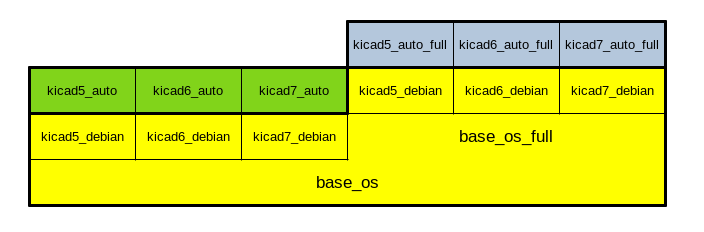
Here are some of the available images:
KiCad 5
| Name | KiBot | KiCad | Debian | KiAuto | KiBoM | iBoM | KiCost | DK plug | PcbDraw | KiDiff |
|---|---|---|---|---|---|---|---|---|---|---|
| setsoft/kicad_auto:10.3-5.1.5 | 0.2.4 | 5.1.5 | 10.3 | 1.3.1 | 1.6.3 | 2.3.1 | -- | -- | -- | -- |
| setsoft/kicad_auto:10.4-5.1.6 | 0.7.0 | 5.1.6 | 10.4 | 1.4.2 | 1.8.0 | 2.3.3 | -- | -- | 0.6.0-2 | -- |
| ghcr.io/inti-cmnb/kicad5_auto:1.2.0 | 1.2.0 | 5.1.9 | 10.4 | 1.6.15 | 1.8.0 | 2.5.0 | 1.1.10 | 0.1.1 | 0.9.0-3 | -- |
| ghcr.io/inti-cmnb/kicad5_auto:1.3.0 | 1.3.0 | 5.1.9 | 11.5 | 2.0.6 | 1.8.0-2 | 2.5.0 | 1.1.12 | 0.1.2 | 0.9.0-4 | 2.4.2 |
| ghcr.io/inti-cmnb/kicad5_auto:1.4.0 | 1.4.0 | 5.1.9 | 11.5 | 2.0.6 | 1.8.0-3 | 2.5.0-2 | 1.1.15 | 0.1.2 | 0.9.0-5 | 2.4.3 |
| ghcr.io/inti-cmnb/kicad5_auto:1.5.1 | 1.5.1 | 5.1.9 | 11.6 | 2.1.1 | 1.8.0-3 | 2.5.0-2 | 1.1.15 | 0.1.2 | 0.9.0-5 | 2.4.3 |
| ghcr.io/inti-cmnb/kicad5_auto:1.6.0 | 1.6.0 | 5.1.9 | 11.6 | 2.2.1 | 1.8.0-3 | 2.5.0-3 | 1.1.15 | 0.1.2 | -- | 2.4.5 |
| ghcr.io/inti-cmnb/kicad5_auto:1.6.1 | 1.6.1 | 5.1.9 | 11.6 | 2.2.1 | 1.8.0-3 | 2.5.0-3 | 1.1.15 | 0.1.2 | -- | 2.4.5 |
| ghcr.io/inti-cmnb/kicad5_auto:1.6.2 | 1.6.2 | 5.1.9 | 11.6 | 2.2.6 | 1.9.0 | 2.6.0 | 1.1.17 | 0.1.2 | -- | 2.4.7 |
| ghcr.io/inti-cmnb/kicad5_auto:1.6.3 | 1.6.3 | 5.1.9 | 11.6 | 2.2.8 | 1.9.1 | 2.8.1 | 1.1.18 | 0.1.2 | -- | 2.5.3 |
| ghcr.io/inti-cmnb/kicad5_auto:1.6.4 | 1.6.4 | 5.1.9 | 11.6 | 2.3.0 | 1.9.1 | 2.8.1 | 1.1.18 | 0.1.2 | -- | 2.5.3 |
KiCad 6
| Name | KiBot | KiCad | Debian | KiAuto | KiBoM | iBoM | KiCost | DK plug | PcbDraw | KiDiff | KiKit |
|---|---|---|---|---|---|---|---|---|---|---|---|
| setsoft/kicad_auto:ki6.0.0_Ubuntu21.10 | 0.11.0 | 6.0.0 | U21.10 | 1.6.5 | 1.8.0 | 2.4.1 | 1.1.15 | 0.1.2 | 0.9.0-1 | -- | -- |
| ghcr.io/inti-cmnb/kicad6_auto:1.2.0 | 1.2.0 | 6.0.5 | 11.3 | 1.6.15 | 1.8.0-2 | 2.5.0 | 1.1.10 | 0.1.1 | 0.9.0-3 | -- | -- |
| ghcr.io/inti-cmnb/kicad6_auto:1.3.0 | 1.3.0 | 6.0.7 | 11.5 | 2.0.6 | 1.8.0-2 | 2.5.0 | 1.1.12 | 0.1.2 | 0.9.0-4 | 2.4.2 | -- |
| ghcr.io/inti-cmnb/kicad6_auto:1.5.1 | 1.5.1 | 6.0.10 | 11.6 | 2.1.1 | 1.8.0-3 | 2.5.0-2 | 1.1.15 | 0.1.2 | 0.9.0-5 | 2.4.3 | 1.2.0 |
| ghcr.io/inti-cmnb/kicad6_auto:1.6.0 | 1.6.0 | 6.0.11 | 11.6 | 2.2.1 | 1.8.0-3 | 2.5.0-3 | 1.1.15 | 0.1.2 | -- | 2.4.5 | 1.3.0-5 |
| ghcr.io/inti-cmnb/kicad6_auto:1.6.1 | 1.6.1 | 6.0.11 | 11.6 | 2.2.1 | 1.8.0-3 | 2.5.0-3 | 1.1.15 | 0.1.2 | -- | 2.4.5 | 1.3.0-5 |
| ghcr.io/inti-cmnb/kicad6_auto:1.6.2 | 1.6.2 | 6.0.11 | 11.6 | 2.2.6 | 1.9.0 | 2.6.0 | 1.1.17 | 0.1.2 | -- | 2.4.7 | 1.3.0-7 |
| ghcr.io/inti-cmnb/kicad6_auto:1.6.3 | 1.6.3 | 6.0.11 | 12.1 | 2.2.8 | 1.9.1 | 2.8.1 | 1.1.18 | 0.1.2 | -- | 2.5.3 | 1.4.0 |
| ghcr.io/inti-cmnb/kicad6_auto:1.6.4 | 1.6.4 | 6.0.11 | 12.1 | 2.3.0 | 1.9.1 | 2.8.1 | 1.1.18 | 0.1.2 | -- | 2.5.3 | 1.5.1 |
KiCad 7
| Name | KiBot | KiCad | Debian | KiAuto | KiBoM | iBoM | KiCost | DK plug | KiDiff | KiKit |
|---|---|---|---|---|---|---|---|---|---|---|
| ghcr.io/inti-cmnb/kicad7_auto:1.6.1 | 1.6.1 | 7.0.1.1 | 11.6 | 2.2.1 | 1.8.0-3 | 2.5.0-3 | 1.1.15 | 0.1.2 | 2.4.5 | 1.3.0-5 |
| ghcr.io/inti-cmnb/kicad7_auto:1.6.2 | 1.6.2 | 7.0.5.1 | 11.6 | 2.2.6 | 1.9.0 | 2.6.0 | 1.1.17 | 0.1.2 | 2.4.7 | 1.3.0-7 |
| ghcr.io/inti-cmnb/kicad7_auto:1.6.3 | 1.6.3 | 7.0.10 | 12.1 | 2.2.8 | 1.9.1 | 2.8.1 | 1.1.18 | 0.1.2 | 2.5.3 | 1.4.0 |
| ghcr.io/inti-cmnb/kicad7_auto:1.6.4 | 1.6.4 | 7.0.11 | 12.1 | 2.3.0 | 1.9.1 | 2.9.0 | 1.1.18 | 0.1.2 | 2.5.3 | 1.5.1 |
KiCad 8
| Name | KiBot | KiCad | Debian | KiAuto | KiBoM | iBoM | KiCost | DK plug | KiDiff | KiKit |
|---|---|---|---|---|---|---|---|---|---|---|
| ghcr.io/inti-cmnb/kicad8_auto:1.6.4 | 1.6.4 | 8.0.1 | sid | 2.3.0 | 1.9.1 | 2.9.0 | 1.1.18 | 0.1.2 | 2.5.3 | 1.5.1 |
You can run it using a script like this:
export USER_ID=$(id -u)
export GROUP_ID=$(id -g)
export WORKDIR=RELATIVE_PATH_TO_KICAD_PROJECTS
export SUBDIR=SUBDIR_INSIDE_WORKDIR
docker run --rm -it -v /tmp/.X11-unix:/tmp/.X11-unix -e DISPLAY=$DISPLAY \
    -v $(pwd)/$WORKDIR:/home/$USER/workdir \
    --user $USER_ID:$GROUP_ID \
    --env NO_AT_BRIDGE=1 \
    --workdir="/home/$USER" \
    --volume="/etc/group:/etc/group:ro" \
    --volume="/home/$USER/.config/kicad:/home/$USER/.config/kicad:rw" \
    --volume="/home/$USER/.cache/kicad:/home/$USER/.cache/kicad:rw" \
    --volume="/etc/passwd:/etc/passwd:ro" \
    --volume="/etc/shadow:/etc/shadow:ro" \
    ghcr.io/inti-cmnb/kicad7_auto:1.6.4 /bin/bash -c "cd workdir/$SUBDIR; kibot"