1201 lines
66 KiB
Markdown
1201 lines
66 KiB
Markdown
# KiBot (formerly KiPlot)
|
|
|
|

|
|
|
|
[](https://github.com/INTI-CMNB/KiBot/actions)
|
|
[](https://coveralls.io/github/INTI-CMNB/KiBot?branch=master)
|
|
[](https://pypi.org/project/kibot/)
|
|
|
|
## Index
|
|
|
|
* [Introduction](#introduction)
|
|
* [Configuration](#configuration)
|
|
* [Usage](#usage)
|
|
* [Installation](#installation)
|
|
* [Usage for CI/CD](#usage-for-cicd)
|
|
* [Credits](#credits)
|
|
|
|
## Introduction
|
|
|
|
KiBot is a program which helps you to generate the fabrication and
|
|
documentation files for your KiCad projects easily, repeatable, and
|
|
most of all, scriptably. This means you can use a Makefile to export
|
|
your KiCad PCBs just as needed.
|
|
|
|
For example, it's common that you might want for each board rev:
|
|
|
|
* Check ERC/DRC one last time (using [KiCad Automation Scripts](https://github.com/INTI-CMNB/kicad-automation-scripts/))
|
|
* Gerbers, drills and drill maps for a fab in their favourite format
|
|
* Fab docs for the assembler, including the BoM (Bill of Materials)
|
|
* Pick and place files
|
|
* PCB 3D model in STEP format
|
|
|
|
You want to do this in a one-touch way, and make sure everything you need to
|
|
do so it securely saved in version control, not on the back of an old
|
|
datasheet.
|
|
|
|
KiBot lets you do this. The following picture depicts the data flow:
|
|
|
|
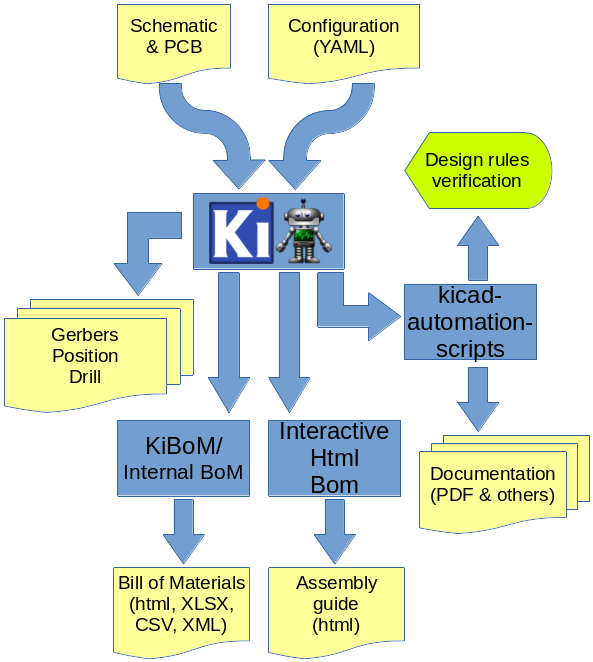
|
|
|
|
|
|
## Configuration
|
|
|
|
KiBot uses a configuration file where you can specify what *outputs* to
|
|
generate. By default you'll generate all of them, but you can specify which
|
|
ones from the command line.
|
|
|
|
The configuration file should be named using the **.kibot.yaml** suffix,
|
|
i.e. *my_project.kibot.yaml*. The format used is [YAML](https://yaml.org/).
|
|
This is basically a text file with some structure.
|
|
This file can be compressed using *gzip* file format.
|
|
|
|
If you never used YAML read the following [explanation](https://github.com/INTI-CMNB/KiBot/blob/master/docs/KiPlotYAML.md).
|
|
Note that the explanation could be useful even if you know YAML.
|
|
|
|
### The header
|
|
|
|
All configuration files must start with:
|
|
|
|
```
|
|
kibot:
|
|
version: 1
|
|
```
|
|
|
|
This tells to KiBot that this file is using version 1 of the format.
|
|
|
|
### The *preflight* section
|
|
|
|
This section is used to specify tasks that will be executed before generating any output.
|
|
|
|
#### Supported preflight options:
|
|
|
|
- check_zone_fills: [boolean=false] Zones are filled before doing any operation involving PCB layers.
|
|
- filters: [list(dict)] A list of entries to filter out ERC/DRC messages.
|
|
* Valid keys:
|
|
- *error_number*: Alias for number.
|
|
- `filter`: [string=''] Name for the filter, for documentation purposes.
|
|
- *filter_msg*: Alias for filter.
|
|
- `number`: [number=0] Error number we want to exclude.
|
|
- `regex`: [string='None'] Regular expression to match the text for the error we want to exclude.
|
|
- *regexp*: Alias for regex.
|
|
- ignore_unconnected: [boolean=false] Option for `run_drc`. Ignores the unconnected nets. Useful if you didn't finish the routing.
|
|
- run_drc: [boolean=false] Runs the DRC (Distance Rules Check). To ensure we have a valid PCB.
|
|
- run_erc: [boolean=false] Runs the ERC (Electrical Rules Check). To ensure the schematic is electrically correct.
|
|
- update_xml: [boolean=false] Update the XML version of the BoM (Bill of Materials).
|
|
To ensure our generated BoM is up to date.
|
|
Note that this isn't needed when using the internal BoM generator (`bom`).
|
|
|
|
|
|
Here is an example of a *preflight* section:
|
|
|
|
```
|
|
preflight:
|
|
run_erc: true
|
|
update_xml: true
|
|
run_drc: true
|
|
check_zone_fills: true
|
|
ignore_unconnected: false
|
|
```
|
|
|
|
#### Filtering DRC/ERC errors
|
|
|
|
Sometimes KiCad reports DRC or ERC errors that you can't get rid off.
|
|
This could be just because you are part of a team including lazzy people that doesn't want to take the extra effort to solve
|
|
some errors that aren't in fact errors, just small violations made on purpose. In this case you could exclude some known errors.
|
|
|
|
For this you must declare `filters` entry in the `preflight` section. Then you can add as many `filter` entries as you want.
|
|
Each filter entry has an optional description and defines to which error type is applied (`number`) and a regular expression
|
|
that the error must match to be ignored (`regex`). Like this:
|
|
|
|
```
|
|
filters:
|
|
- filter: 'Optional filter description'
|
|
number: Numeric_error_type
|
|
regex: 'Expression to match'
|
|
```
|
|
|
|
Here is an example, suppose you are getting the following errors:
|
|
|
|
```
|
|
** Found 1 DRC errors **
|
|
ErrType(4): Track too close to pad
|
|
@(177.185 mm, 78.315 mm): Track 1.000 mm [Net-(C3-Pad1)] on F.Cu, length: 1.591 mm
|
|
@(177.185 mm, 80.715 mm): Pad 2 of C3 on F.Cu and others
|
|
|
|
** Found 1 unconnected pads **
|
|
ErrType(2): Unconnected items
|
|
@(177.185 mm, 73.965 mm): Pad 2 of C4 on F.Cu and others
|
|
@(177.185 mm, 80.715 mm): Pad 2 of C3 on F.Cu and others
|
|
```
|
|
|
|
And you want to ignore them. You can add the following filters:
|
|
|
|
```
|
|
filters:
|
|
- filter: 'Ignore C3 pad 2 too close to anything'
|
|
number: 4
|
|
regex: 'Pad 2 of C3'
|
|
- filter: 'Ignore unconnected pad 2 of C4'
|
|
number: 2
|
|
regex: 'Pad 2 of C4'
|
|
```
|
|
|
|
If you need to match text from two different lines in the error message try using `(?s)TEXT(.*)TEXT_IN_OTHER_LINE`.
|
|
|
|
If you have two or more different options for a text to match try using `(OPTION1|OPTION2)`.
|
|
|
|
A complete Python regular expressions explanation is out the scope of this manual. For a complete reference consult the [Python manual](https://docs.python.org/3/library/re.html).
|
|
|
|
**Important note**: this will create a file named *kibot_errors.filter* in the output directory.
|
|
|
|
|
|
### Default global options
|
|
|
|
The section `global` contains default global options that affects all the outputs.
|
|
Currently only one option is supported.
|
|
|
|
#### Default `output` option
|
|
|
|
This option controls the default file name pattern used by all the outputs. This makes all the file names coherent.
|
|
You can always choose the file name for a particular output.
|
|
|
|
The pattern uses the following expansions:
|
|
|
|
- **%f** original pcb/sch file name without extension.
|
|
- **%p** pcb/sch title from pcb metadata.
|
|
- **%c** company from pcb/sch metadata.
|
|
- **%r** revision from pcb/sch metadata.
|
|
- **%d** pcb/sch date from metadata if available, file modification date otherwise.
|
|
- **%D** date the script was started.
|
|
- **%T** time the script was started.
|
|
- **%i** a contextual ID, depends on the output type.
|
|
- **%x** a suitable extension for the output type.
|
|
|
|
They are compatible with the ones used by IBoM.
|
|
The default value for `global.output` is `%f-%i.%x`.
|
|
If you want to include the revision you could add the following definition:
|
|
|
|
```
|
|
global:
|
|
output: '%f_rev_%r-%i.%x'
|
|
```
|
|
|
|
### The *outputs* section
|
|
|
|
In this section you put all the things that you want to generate. This section contains one or more **outputs**. Each output contain the following data:
|
|
|
|
- `name` a name so you can easily identify it.
|
|
- `comment` a short description of this output.
|
|
- `type` selects which type of output will be generated. Examples are *gerbers*, *drill files* and *pick & place files*
|
|
- `dir` is the directory where this output will be stored.
|
|
- `options` contains one or more options to configure this output.
|
|
- `layers` a list of layers used for this output. Not all outputs needs this subsection.
|
|
|
|
**Important note about the layers**: In the original [kiplot](https://github.com/johnbeard/kiplot)
|
|
(from [John Beard](https://github.com/johnbeard)) the name of the inner layers was *Inner.N* where
|
|
*N* is the number of the layer, i.e. *Inner.1* is the first inner layer.
|
|
This format is supported for compatibility.
|
|
Note that this generated a lot of confusion because the default KiCad name for the first inner layer
|
|
is *In1.Cu*.
|
|
People filled issues and submitted pull-requests to fix it, thinking that inner layers weren't supported.
|
|
Currently KiCad allows renaming these layers, so this version of kiplot supports the name used in
|
|
KiCad. Just use the same name you see in the user interface.
|
|
|
|
The available values for *type* are:
|
|
- Plot formats:
|
|
- `gerber` the gerbers for fabrication.
|
|
- `ps` postscript plot
|
|
- `hpgl` format for laser printers
|
|
- `svg` scalable vector graphics
|
|
- `pdf` portable document format
|
|
- `dxf` mechanical CAD format
|
|
- Drill formats:
|
|
- `excellon` data for the drilling machine
|
|
- `gerb_drill` drilling positions in a gerber file
|
|
- Pick & place
|
|
- `position` of the components for the pick & place machine
|
|
- Documentation
|
|
- `pdf_sch_print` schematic in PDF format
|
|
- `pdf_pcb_print`PDF file containing one or more layer and the page frame
|
|
- Bill of Materials
|
|
- `kibom` BoM in HTML or CSV format generated by [KiBoM](https://github.com/INTI-CMNB/KiBoM)
|
|
- `ibom` Interactive HTML BoM generated by [InteractiveHtmlBom](https://github.com/INTI-CMNB/InteractiveHtmlBom)
|
|
- 3D model:
|
|
- `step` *Standard for the Exchange of Product Data* for the PCB
|
|
|
|
Here is an example of a configuration file to generate the gerbers for the top and bottom layers:
|
|
|
|
```
|
|
kibot:
|
|
version: 1
|
|
|
|
preflight:
|
|
run_drc: true
|
|
|
|
outputs:
|
|
|
|
- name: 'gerbers'
|
|
comment: "Gerbers for the board house"
|
|
type: gerber
|
|
dir: gerberdir
|
|
options:
|
|
# generic layer options
|
|
exclude_edge_layer: false
|
|
exclude_pads_from_silkscreen: false
|
|
plot_sheet_reference: false
|
|
plot_footprint_refs: true
|
|
plot_footprint_values: true
|
|
force_plot_invisible_refs_vals: false
|
|
tent_vias: true
|
|
line_width: 0.15
|
|
|
|
# gerber options
|
|
use_aux_axis_as_origin: false
|
|
subtract_mask_from_silk: true
|
|
use_protel_extensions: false
|
|
gerber_precision: 4.5
|
|
create_gerber_job_file: true
|
|
use_gerber_x2_attributes: true
|
|
use_gerber_net_attributes: false
|
|
|
|
layers:
|
|
- 'F.Cu'
|
|
- 'B.Cu'
|
|
```
|
|
|
|
Most options are the same you'll find in the KiCad dialogs.
|
|
|
|
|
|
#### Specifying the layers
|
|
|
|
You have various ways to specify the layers. If you need to specify just one layer you can just use its name:
|
|
|
|
```
|
|
layers: 'F.Cu'
|
|
```
|
|
|
|
If you want to specify all the available layers:
|
|
|
|
```
|
|
layers: 'all'
|
|
```
|
|
|
|
You can also select the layers you want in KiCad (using File, Plot dialog) and save your PCB.
|
|
Then you just need to use:
|
|
|
|
```
|
|
layers: 'selected'
|
|
```
|
|
|
|
You can also use any of the following grup of layers:
|
|
|
|
- **copper** all the copper layers
|
|
- **technical** all the technical layers (silk sreen, solder mask, paste, adhesive, etc.)
|
|
- **user** all the user layers (draw, comments, eco, margin, edge cuts, etc.)
|
|
|
|
You can also mix the above definitions using a list:
|
|
|
|
```
|
|
layers:
|
|
- 'copper'
|
|
- 'Dwgs.User'
|
|
```
|
|
|
|
This will select all the copper layers and the user drawings.
|
|
Note that the above mentioned options will use file name suffixes and descriptions selected automatically.
|
|
If you want to use a particular suffix and provide better descriptions you can use the following format:
|
|
|
|
```
|
|
layers:
|
|
- layer: 'F.Cu'
|
|
suffix: 'F_Cu'
|
|
description: 'Front copper'
|
|
- layer: 'B.Cu'
|
|
suffix: 'B_Cu'
|
|
description: 'Bottom copper'
|
|
```
|
|
|
|
You can also mix the styles:
|
|
|
|
```
|
|
layers:
|
|
- 'copper'
|
|
- layer: 'Cmts.User'
|
|
suffix: 'Cmts_User'
|
|
description: 'User comments'
|
|
- 'Dwgs.User'
|
|
```
|
|
|
|
If you need to use the same list of layers for various outputs you can use YAML anchors.
|
|
The first time you define the list of layers just assign an ancho, here is an example:
|
|
|
|
```
|
|
layers: &copper_and_cmts
|
|
- copper
|
|
- 'Cmts.User'
|
|
```
|
|
|
|
Next time you need this list just use an alias, like this:
|
|
|
|
```
|
|
layers: *copper_and_cmts
|
|
```
|
|
|
|
#### Supported outputs:
|
|
|
|
* BoM (Bill of Materials)
|
|
* Type: `bom`
|
|
* Description: Used to generate the BoM in CSV, HTML, TSV, TXT, XML or XLSX format using the internal BoM.
|
|
Is compatible with KiBoM, but doesn't need to update the XML netlist because the components
|
|
are loaded from the schematic.
|
|
Important differences with KiBoM output:
|
|
- All options are in the main `options` section, not in `conf` subsection.
|
|
- The `Component` column is named `Row` and works just like any other column.
|
|
This output is what you get from the 'Tools/Generate Bill of Materials' menu in eeschema.
|
|
* Valid keys:
|
|
- `comment`: [string=''] A comment for documentation purposes.
|
|
- `dir`: [string='.'] Output directory for the generated files.
|
|
- `name`: [string=''] Used to identify this particular output definition.
|
|
- `options`: [dict] Options for the `bom` output.
|
|
* Valid keys:
|
|
- `columns`: [list(dict)|list(string)] List of columns to display.
|
|
Can be just the name of the field.
|
|
* Valid keys:
|
|
- `field`: [string=''] Name of the field to use for this column.
|
|
- `join`: [list(string)|string=''] List of fields to join to this column.
|
|
- `name`: [string=''] Name to display in the header. The field is used when empty.
|
|
- `component_aliases`: [list(list(string))] A series of values which are considered to be equivalent for the part name.
|
|
Each entry is a list of equivalen names. Example: ['c', 'c_small', 'cap' ]
|
|
will ensure the equivalent capacitor symbols can be grouped together.
|
|
If empty the following aliases are used:
|
|
- ['r', 'r_small', 'res', 'resistor']
|
|
- ['l', 'l_small', 'inductor']
|
|
- ['c', 'c_small', 'cap', 'capacitor']
|
|
- ['sw', 'switch']
|
|
- ['zener', 'zenersmall']
|
|
- ['d', 'diode', 'd_small'].
|
|
- `csv`: [dict] Options for the CSV, TXT and TSV formats.
|
|
* Valid keys:
|
|
- `hide_pcb_info`: [boolean=false] Hide project information.
|
|
- `hide_stats_info`: [boolean=false] Hide statistics information.
|
|
- `quote_all`: [boolean=false] Enclose all values using double quotes.
|
|
- `separator`: [string=','] CSV Separator. TXT and TSV always use tab as delimiter.
|
|
- `dnc_filter`: [string|list(string)='_kibom_dnc'] Name of the filter to mark components as 'Do Not Change'.
|
|
The default filter marks components with a DNC value or DNC in the Config field.
|
|
- `dnf_filter`: [string|list(string)='_kibom_dnf'] Name of the filter to mark components as 'Do Not Fit'.
|
|
The default filter marks components with a DNF value or DNF in the Config field.
|
|
- `exclude_filter`: [string|list(string)='_mechanical'] Name of the filter to exclude components from BoM processing.
|
|
The default filter excludes test points, fiducial marks, mounting holes, etc.
|
|
- `fit_field`: [string='Config'] Field name used for internal filters.
|
|
- `format`: [string=''] [HTML,CSV,TXT,TSV,XML,XLSX] format for the BoM.
|
|
If empty defaults to CSV or a guess according to the options..
|
|
- `group_connectors`: [boolean=true] Connectors with the same footprints will be grouped together, independent of the name of the connector.
|
|
- `group_fields`: [list(string)] List of fields used for sorting individual components into groups.
|
|
Components which match (comparing *all* fields) will be grouped together.
|
|
Field names are case-insensitive.
|
|
If empty: ['Part', 'Part Lib', 'Value', 'Footprint', 'Footprint Lib'] is used.
|
|
- `html`: [dict] Options for the HTML format.
|
|
* Valid keys:
|
|
- `col_colors`: [boolean=true] Use colors to show the field type.
|
|
- `datasheet_as_link`: [string=''] Column with links to the datasheet.
|
|
- `digikey_link`: [string|list(string)=''] Column/s containing Digi-Key part numbers, will be linked to web page.
|
|
- `generate_dnf`: [boolean=true] Generate a separated section for DNF (Do Not Fit) components.
|
|
- `hide_pcb_info`: [boolean=false] Hide project information.
|
|
- `hide_stats_info`: [boolean=false] Hide statistics information.
|
|
- `highlight_empty`: [boolean=true] Use a color for empty cells. Applies only when `col_colors` is `true`.
|
|
- `logo`: [string|boolean=''] PNG file to use as logo, use false to remove.
|
|
- `style`: [string='modern-blue'] Page style. Internal styles: modern-blue, modern-green, modern-red and classic.
|
|
Or you can provide a CSS file name. Please use .css as file extension..
|
|
- `title`: [string='KiBot Bill of Materials'] BoM title.
|
|
- `ignore_dnf`: [boolean=true] Exclude DNF (Do Not Fit) components.
|
|
- `merge_blank_fields`: [boolean=true] Component groups with blank fields will be merged into the most compatible group, where possible.
|
|
- `normalize_locale`: [boolean=false] When normalizing values use the locale decimal point.
|
|
- `normalize_values`: [boolean=false] Try to normalize the R, L and C values, producing uniform units and prefixes.
|
|
- `number`: [number=1] Number of boards to build (components multiplier).
|
|
- `output`: [string='%f-%i%v.%x'] filename for the output (%i=bom). Affected by global options.
|
|
- `use_alt`: [boolean=false] Print grouped references in the alternate compressed style eg: R1-R7,R18.
|
|
- `variant`: [string=''] Board variant, used to determine which components
|
|
are output to the BoM..
|
|
- `xlsx`: [dict] Options for the XLSX format.
|
|
* Valid keys:
|
|
- `col_colors`: [boolean=true] Use colors to show the field type.
|
|
- `datasheet_as_link`: [string=''] Column with links to the datasheet.
|
|
- `digikey_link`: [string|list(string)=''] Column/s containing Digi-Key part numbers, will be linked to web page.
|
|
- `generate_dnf`: [boolean=true] Generate a separated section for DNF (Do Not Fit) components.
|
|
- `hide_pcb_info`: [boolean=false] Hide project information.
|
|
- `hide_stats_info`: [boolean=false] Hide statistics information.
|
|
- `highlight_empty`: [boolean=true] Use a color for empty cells. Applies only when `col_colors` is `true`.
|
|
- `logo`: [string|boolean=''] PNG file to use as logo, use false to remove.
|
|
- `max_col_width`: [number=60] [20,999] Maximum column width (characters).
|
|
- `style`: [string='modern-blue'] Head style: modern-blue, modern-green, modern-red and classic..
|
|
- `title`: [string='KiBot Bill of Materials'] BoM title.
|
|
|
|
* DXF (Drawing Exchange Format)
|
|
* Type: `dxf`
|
|
* Description: Exports the PCB to 2D mechanical EDA tools (like AutoCAD).
|
|
This output is what you get from the File/Plot menu in pcbnew.
|
|
* Valid keys:
|
|
- `comment`: [string=''] A comment for documentation purposes.
|
|
- `dir`: [string='.'] Output directory for the generated files.
|
|
- `layers`: [list(dict)|list(string)|string] [all,selected,copper,technical,user]
|
|
List of PCB layers to plot.
|
|
* Valid keys:
|
|
- `description`: [string=''] A description for the layer, for documentation purposes.
|
|
- `layer`: [string=''] Name of the layer. As you see it in KiCad.
|
|
- `suffix`: [string=''] Suffix used in file names related to this layer. Derived from the name if not specified.
|
|
- `name`: [string=''] Used to identify this particular output definition.
|
|
- `options`: [dict] Options for the `dxf` output.
|
|
* Valid keys:
|
|
- `dnf_filter`: [string|list(string)=''] Name of the filter to mark components as not fitted.
|
|
A short-cut to use for simple cases where a variant is an overkill.
|
|
- `drill_marks`: [string='full'] what to use to indicate the drill places, can be none, small or full (for real scale).
|
|
- `exclude_edge_layer`: [boolean=true] do not include the PCB edge layer.
|
|
- `exclude_pads_from_silkscreen`: [boolean=false] do not plot the component pads in the silk screen.
|
|
- `force_plot_invisible_refs_vals`: [boolean=false] include references and values even when they are marked as invisible.
|
|
- `metric_units`: [boolean=false] use mm instead of inches.
|
|
- `output`: [string='%f-%i%v.%x'] output file name, the default KiCad name if empty. Affected by global options.
|
|
- `plot_footprint_refs`: [boolean=true] include the footprint references.
|
|
- `plot_footprint_values`: [boolean=true] include the footprint values.
|
|
- `plot_sheet_reference`: [boolean=false] currently without effect.
|
|
- `polygon_mode`: [boolean=true] plot using the contour, instead of the center line.
|
|
- `sketch_plot`: [boolean=false] don't fill objects, just draw the outline.
|
|
- `tent_vias`: [boolean=true] cover the vias.
|
|
- `use_aux_axis_as_origin`: [boolean=false] use the auxiliar axis as origin for coordinates.
|
|
- `variant`: [string=''] Board variant to apply.
|
|
|
|
* Excellon drill format
|
|
* Type: `excellon`
|
|
* Description: This is the main format for the drilling machine.
|
|
You can create a map file for documentation purposes.
|
|
This output is what you get from the 'File/Fabrication output/Drill Files' menu in pcbnew.
|
|
* Valid keys:
|
|
- `comment`: [string=''] A comment for documentation purposes.
|
|
- `dir`: [string='.'] Output directory for the generated files.
|
|
- `name`: [string=''] Used to identify this particular output definition.
|
|
- `options`: [dict] Options for the `excellon` output.
|
|
* Valid keys:
|
|
- `map`: [dict|string] [hpgl,ps,gerber,dxf,svg,pdf] format for a graphical drill map.
|
|
Not generated unless a format is specified.
|
|
* Valid keys:
|
|
- `output`: [string='%f-%i%v.%x'] name for the map file, KiCad defaults if empty (%i='PTH_drill_map'). Affected by global options.
|
|
- `type`: [string='pdf'] [hpgl,ps,gerber,dxf,svg,pdf] format for a graphical drill map.
|
|
- `metric_units`: [boolean=true] use metric units instead of inches.
|
|
- `minimal_header`: [boolean=false] use a minimal header in the file.
|
|
- `mirror_y_axis`: [boolean=false] invert the Y axis.
|
|
- `output`: [string='%f-%i%v.%x'] name for the drill file, KiCad defaults if empty (%i='PTH_drill'). Affected by global options.
|
|
- `pth_and_npth_single_file`: [boolean=true] generate one file for both, plated holes and non-plated holes, instead of two separated files.
|
|
- `report`: [dict|string] name of the drill report. Not generated unless a name is specified.
|
|
* Valid keys:
|
|
- `filename`: [string=''] name of the drill report. Not generated unless a name is specified.
|
|
(%i='drill_report' %x='txt').
|
|
- `use_aux_axis_as_origin`: [boolean=false] use the auxiliar axis as origin for coordinates.
|
|
|
|
* Gerber drill format
|
|
* Type: `gerb_drill`
|
|
* Description: This is the information for the drilling machine in gerber format.
|
|
You can create a map file for documentation purposes.
|
|
This output is what you get from the 'File/Fabrication output/Drill Files' menu in pcbnew.
|
|
* Valid keys:
|
|
- `comment`: [string=''] A comment for documentation purposes.
|
|
- `dir`: [string='.'] Output directory for the generated files.
|
|
- `name`: [string=''] Used to identify this particular output definition.
|
|
- `options`: [dict] Options for the `gerb_drill` output.
|
|
* Valid keys:
|
|
- `map`: [dict|string] [hpgl,ps,gerber,dxf,svg,pdf] format for a graphical drill map.
|
|
Not generated unless a format is specified.
|
|
* Valid keys:
|
|
- `output`: [string='%f-%i%v.%x'] name for the map file, KiCad defaults if empty (%i='PTH_drill_map'). Affected by global options.
|
|
- `type`: [string='pdf'] [hpgl,ps,gerber,dxf,svg,pdf] format for a graphical drill map.
|
|
- `output`: [string='%f-%i%v.%x'] name for the drill file, KiCad defaults if empty (%i='PTH_drill'). Affected by global options.
|
|
- `report`: [dict|string] name of the drill report. Not generated unless a name is specified.
|
|
* Valid keys:
|
|
- `filename`: [string=''] name of the drill report. Not generated unless a name is specified.
|
|
(%i='drill_report' %x='txt').
|
|
- `use_aux_axis_as_origin`: [boolean=false] use the auxiliar axis as origin for coordinates.
|
|
|
|
* Gerber format
|
|
* Type: `gerber`
|
|
* Description: This is the main fabrication format for the PCB.
|
|
This output is what you get from the File/Plot menu in pcbnew.
|
|
* Valid keys:
|
|
- `comment`: [string=''] A comment for documentation purposes.
|
|
- `dir`: [string='.'] Output directory for the generated files.
|
|
- `layers`: [list(dict)|list(string)|string] [all,selected,copper,technical,user]
|
|
List of PCB layers to plot.
|
|
* Valid keys:
|
|
- `description`: [string=''] A description for the layer, for documentation purposes.
|
|
- `layer`: [string=''] Name of the layer. As you see it in KiCad.
|
|
- `suffix`: [string=''] Suffix used in file names related to this layer. Derived from the name if not specified.
|
|
- `name`: [string=''] Used to identify this particular output definition.
|
|
- `options`: [dict] Options for the `gerber` output.
|
|
* Valid keys:
|
|
- `create_gerber_job_file`: [boolean=true] creates a file with information about all the generated gerbers.
|
|
You can use it in gerbview to load all gerbers at once.
|
|
- `dnf_filter`: [string|list(string)=''] Name of the filter to mark components as not fitted.
|
|
A short-cut to use for simple cases where a variant is an overkill.
|
|
- `exclude_edge_layer`: [boolean=true] do not include the PCB edge layer.
|
|
- `exclude_pads_from_silkscreen`: [boolean=false] do not plot the component pads in the silk screen.
|
|
- `force_plot_invisible_refs_vals`: [boolean=false] include references and values even when they are marked as invisible.
|
|
- `gerber_job_file`: [string='%f-%i%v.%x'] name for the gerber job file (%i='job', %x='gbrjob'). Affected by global options.
|
|
- `gerber_precision`: [number=4.6] this the gerber coordinate format, can be 4.5 or 4.6.
|
|
- `line_width`: [number=0.1] [0.02,2] line_width for objects without width [mm].
|
|
- `output`: [string='%f-%i%v.%x'] output file name, the default KiCad name if empty. Affected by global options.
|
|
- `plot_footprint_refs`: [boolean=true] include the footprint references.
|
|
- `plot_footprint_values`: [boolean=true] include the footprint values.
|
|
- `plot_sheet_reference`: [boolean=false] currently without effect.
|
|
- `subtract_mask_from_silk`: [boolean=false] substract the solder mask from the silk screen.
|
|
- `tent_vias`: [boolean=true] cover the vias.
|
|
- `use_aux_axis_as_origin`: [boolean=false] use the auxiliar axis as origin for coordinates.
|
|
- `use_gerber_net_attributes`: [boolean=true] include netlist metadata.
|
|
- `use_gerber_x2_attributes`: [boolean=true] use the extended X2 format.
|
|
- `use_protel_extensions`: [boolean=false] use legacy Protel file extensions.
|
|
- `variant`: [string=''] Board variant to apply.
|
|
|
|
* HPGL (Hewlett & Packard Graphics Language)
|
|
* Type: `hpgl`
|
|
* Description: Exports the PCB for plotters and laser printers.
|
|
This output is what you get from the File/Plot menu in pcbnew.
|
|
* Valid keys:
|
|
- `comment`: [string=''] A comment for documentation purposes.
|
|
- `dir`: [string='.'] Output directory for the generated files.
|
|
- `layers`: [list(dict)|list(string)|string] [all,selected,copper,technical,user]
|
|
List of PCB layers to plot.
|
|
* Valid keys:
|
|
- `description`: [string=''] A description for the layer, for documentation purposes.
|
|
- `layer`: [string=''] Name of the layer. As you see it in KiCad.
|
|
- `suffix`: [string=''] Suffix used in file names related to this layer. Derived from the name if not specified.
|
|
- `name`: [string=''] Used to identify this particular output definition.
|
|
- `options`: [dict] Options for the `hpgl` output.
|
|
* Valid keys:
|
|
- `dnf_filter`: [string|list(string)=''] Name of the filter to mark components as not fitted.
|
|
A short-cut to use for simple cases where a variant is an overkill.
|
|
- `drill_marks`: [string='full'] what to use to indicate the drill places, can be none, small or full (for real scale).
|
|
- `exclude_edge_layer`: [boolean=true] do not include the PCB edge layer.
|
|
- `exclude_pads_from_silkscreen`: [boolean=false] do not plot the component pads in the silk screen.
|
|
- `force_plot_invisible_refs_vals`: [boolean=false] include references and values even when they are marked as invisible.
|
|
- `mirror_plot`: [boolean=false] plot mirrored.
|
|
- `output`: [string='%f-%i%v.%x'] output file name, the default KiCad name if empty. Affected by global options.
|
|
- `pen_number`: [number=1] [1,16] pen number.
|
|
- `pen_speed`: [number=20] [1,99] pen speed.
|
|
- `pen_width`: [number=15] [0,100] pen diameter in MILS, useful to fill areas. However, it is in mm in HPGL files.
|
|
- `plot_footprint_refs`: [boolean=true] include the footprint references.
|
|
- `plot_footprint_values`: [boolean=true] include the footprint values.
|
|
- `plot_sheet_reference`: [boolean=false] currently without effect.
|
|
- `scaling`: [number=0] scale factor (0 means autoscaling).
|
|
- `sketch_plot`: [boolean=false] don't fill objects, just draw the outline.
|
|
- `tent_vias`: [boolean=true] cover the vias.
|
|
- `variant`: [string=''] Board variant to apply.
|
|
|
|
* IBoM (Interactive HTML BoM)
|
|
* Type: `ibom`
|
|
* Description: Generates an interactive web page useful to identify the position of the components in the PCB.
|
|
For more information: https://github.com/INTI-CMNB/InteractiveHtmlBom
|
|
This output is what you get from the InteractiveHtmlBom plug-in (pcbnew).
|
|
* Valid keys:
|
|
- `comment`: [string=''] A comment for documentation purposes.
|
|
- `dir`: [string='.'] Output directory for the generated files.
|
|
- `name`: [string=''] Used to identify this particular output definition.
|
|
- `options`: [dict] Options for the `ibom` output.
|
|
* Valid keys:
|
|
- `blacklist`: [string=''] List of comma separated blacklisted components or prefixes with *. E.g. 'X1,MH*'.
|
|
IBoM option, avoid using in conjunction with KiBot variants/filters.
|
|
- `blacklist_empty_val`: [boolean=false] Blacklist components with empty value.
|
|
IBoM option, avoid using in conjunction with KiBot variants/filters.
|
|
- `board_rotation`: [number=0] Board rotation in degrees (-180 to 180). Will be rounded to multiple of 5.
|
|
- `bom_view`: [string='left-right'] [bom-only,left-right,top-bottom] Default BOM view.
|
|
- `checkboxes`: [string='Sourced,Placed'] Comma separated list of checkbox columns.
|
|
- `dark_mode`: [boolean=false] Default to dark mode.
|
|
- `dnf_filter`: [string|list(string)=''] Name of the filter to mark components as not fitted.
|
|
A short-cut to use for simple cases where a variant is an overkill.
|
|
Avoid using it in conjunction with with IBoM native filtering options.
|
|
- `dnp_field`: [string=''] Name of the extra field that indicates do not populate status.
|
|
Components with this field not empty will be blacklisted.
|
|
IBoM option, avoid using in conjunction with KiBot variants/filters.
|
|
- `extra_fields`: [string=''] Comma separated list of extra fields to pull from netlist or xml file.
|
|
- `hide_pads`: [boolean=false] Hide footprint pads by default.
|
|
- `hide_silkscreen`: [boolean=false] Hide silkscreen by default.
|
|
- `highlight_pin1`: [boolean=false] Highlight pin1 by default.
|
|
- `include_nets`: [boolean=false] Include netlist information in output..
|
|
- `include_tracks`: [boolean=false] Include track/zone information in output. F.Cu and B.Cu layers only.
|
|
- `layer_view`: [string='FB'] [F,FB,B] Default layer view.
|
|
- `name_format`: [string='ibom'] Output file name format supports substitutions:
|
|
%f : original pcb file name without extension.
|
|
%p : pcb/project title from pcb metadata.
|
|
%c : company from pcb metadata.
|
|
%r : revision from pcb metadata.
|
|
%d : pcb date from metadata if available, file modification date otherwise.
|
|
%D : bom generation date.
|
|
%T : bom generation time.
|
|
Extension .html will be added automatically.
|
|
Note that this name is used only when output is ''.
|
|
- `netlist_file`: [string=''] Path to netlist or xml file.
|
|
- `no_blacklist_virtual`: [boolean=false] Do not blacklist virtual components.
|
|
IBoM option, avoid using in conjunction with KiBot variants/filters.
|
|
- `no_redraw_on_drag`: [boolean=false] Do not redraw pcb on drag by default.
|
|
- `normalize_field_case`: [boolean=false] Normalize extra field name case. E.g. 'MPN' and 'mpn' will be considered the same field.
|
|
- `output`: [string='%f-%i%v.%x'] Filename for the output, use '' to use the IBoM filename (%i=ibom, %x=html). Affected by global options.
|
|
- `show_fabrication`: [boolean=false] Show fabrication layer by default.
|
|
- `sort_order`: [string='C,R,L,D,U,Y,X,F,SW,A,~,HS,CNN,J,P,NT,MH'] Default sort order for components. Must contain '~' once.
|
|
- `variant`: [string=''] Board variant to apply.
|
|
Avoid using it in conjunction with with IBoM native filtering options.
|
|
- `variant_field`: [string=''] Name of the extra field that stores board variant for component.
|
|
IBoM option, avoid using in conjunction with KiBot variants/filters.
|
|
- `variants_blacklist`: [string=''] List of board variants to exclude from the BOM.
|
|
IBoM option, avoid using in conjunction with KiBot variants/filters.
|
|
- `variants_whitelist`: [string=''] List of board variants to include in the BOM.
|
|
IBoM option, avoid using in conjunction with KiBot variants/filters.
|
|
|
|
* KiBoM (KiCad Bill of Materials)
|
|
* Type: `kibom`
|
|
* Description: Used to generate the BoM in HTML or CSV format using the KiBoM plug-in.
|
|
For more information: https://github.com/INTI-CMNB/KiBoM
|
|
Note that this output is provided as a compatibility tool.
|
|
We recommend using the `bom` output instead.
|
|
This output is what you get from the 'Tools/Generate Bill of Materials' menu in eeschema.
|
|
* Valid keys:
|
|
- `comment`: [string=''] A comment for documentation purposes.
|
|
- `dir`: [string='.'] Output directory for the generated files.
|
|
- `name`: [string=''] Used to identify this particular output definition.
|
|
- `options`: [dict] Options for the `kibom` output.
|
|
* Valid keys:
|
|
- `conf`: [string|dict] BoM configuration file, relative to PCB.
|
|
You can also define the configuration here, will be stored in `config.kibom.ini`.
|
|
* Valid keys:
|
|
- `columns`: [list(dict)|list(string)] List of columns to display.
|
|
Can be just the name of the field.
|
|
* Valid keys:
|
|
- `field`: [string=''] Name of the field to use for this column.
|
|
- `join`: [list(string)|string=''] List of fields to join to this column.
|
|
- `name`: [string=''] Name to display in the header. The field is used when empty.
|
|
- `component_aliases`: [list(list(string))] A series of values which are considered to be equivalent for the part name.
|
|
Each entry is a list of equivalen names. Example: ['c', 'c_small', 'cap' ]
|
|
will ensure the equivalent capacitor symbols can be grouped together.
|
|
If empty the following aliases are used:
|
|
- ['r', 'r_small', 'res', 'resistor']
|
|
- ['l', 'l_small', 'inductor']
|
|
- ['c', 'c_small', 'cap', 'capacitor']
|
|
- ['sw', 'switch']
|
|
- ['zener', 'zenersmall']
|
|
- ['d', 'diode', 'd_small'].
|
|
- `datasheet_as_link`: [string=''] Column with links to the datasheet (HTML only).
|
|
- `digikey_link`: [string|list(string)=''] Column/s containing Digi-Key part numbers, will be linked to web page (HTML only).
|
|
- `exclude_any`: [list(dict)] A series of regular expressions used to exclude parts.
|
|
If a component matches ANY of these, it will be excluded.
|
|
Column names are case-insensitive.
|
|
If empty the following list is used:
|
|
- column: References
|
|
regex: '^TP[0-9]*'
|
|
- column: References
|
|
regex: '^FID'
|
|
- column: Part
|
|
regex: 'mount.*hole'
|
|
- column: Part
|
|
regex: 'solder.*bridge'
|
|
- column: Part
|
|
regex: 'test.*point'
|
|
- column: Footprint
|
|
regex 'test.*point'
|
|
- column: Footprint
|
|
regex: 'mount.*hole'
|
|
- column: Footprint
|
|
regex: 'fiducial'.
|
|
* Valid keys:
|
|
- `column`: [string=''] Name of the column to apply the regular expression.
|
|
- *field*: Alias for column.
|
|
- `regex`: [string=''] Regular expression to match.
|
|
- *regexp*: Alias for regex.
|
|
- `fit_field`: [string='Config'] Field name used to determine if a particular part is to be fitted (also DNC and variants).
|
|
- `group_connectors`: [boolean=true] Connectors with the same footprints will be grouped together, independent of the name of the connector.
|
|
- `group_fields`: [list(string)] List of fields used for sorting individual components into groups.
|
|
Components which match (comparing *all* fields) will be grouped together.
|
|
Field names are case-insensitive.
|
|
If empty: ['Part', 'Part Lib', 'Value', 'Footprint', 'Footprint Lib'] is used.
|
|
- `hide_headers`: [boolean=false] Hide column headers.
|
|
- `hide_pcb_info`: [boolean=false] Hide project information.
|
|
- `html_generate_dnf`: [boolean=true] Generate a separated section for DNF (Do Not Fit) components (HTML only).
|
|
- `ignore_dnf`: [boolean=true] Exclude DNF (Do Not Fit) components.
|
|
- `include_only`: [list(dict)] A series of regular expressions used to select included parts.
|
|
If there are any regex defined here, only components that match against ANY of them will be included.
|
|
Column names are case-insensitive.
|
|
If empty all the components are included.
|
|
* Valid keys:
|
|
- `column`: [string=''] Name of the column to apply the regular expression.
|
|
- *field*: Alias for column.
|
|
- `regex`: [string=''] Regular expression to match.
|
|
- *regexp*: Alias for regex.
|
|
- `merge_blank_fields`: [boolean=true] Component groups with blank fields will be merged into the most compatible group, where possible.
|
|
- `number_rows`: [boolean=true] First column is the row number.
|
|
- `test_regex`: [boolean=true] Each component group will be tested against a number of regular-expressions (see ``)..
|
|
- `use_alt`: [boolean=false] Print grouped references in the alternate compressed style eg: R1-R7,R18.
|
|
- `format`: [string='HTML'] [HTML,CSV,XML,XLSX] format for the BoM.
|
|
- `number`: [number=1] Number of boards to build (components multiplier).
|
|
- `output`: [string='%f-%i%v.%x'] filename for the output (%i=bom). Affected by global options.
|
|
- `separator`: [string=','] CSV Separator.
|
|
- `variant`: [string=''] Board variant(s), used to determine which components
|
|
are output to the BoM. To specify multiple variants,
|
|
with a BOM file exported for each variant, separate
|
|
variants with the ';' (semicolon) character.
|
|
This isn't related to the KiBot concept of variants.
|
|
|
|
* PcbDraw - Beautiful 2D PCB render
|
|
* Type: `pcbdraw`
|
|
* Description: Exports the PCB as a 2D model (SVG, PNG or JPG).
|
|
Uses configurable colors.
|
|
Can also render the components if the 2D models are available
|
|
* Valid keys:
|
|
- `comment`: [string=''] A comment for documentation purposes.
|
|
- `dir`: [string='.'] Output directory for the generated files.
|
|
- `name`: [string=''] Used to identify this particular output definition.
|
|
- `options`: [dict] Options for the `pcbdraw` output.
|
|
* Valid keys:
|
|
- `bottom`: [boolean=false] render the bottom side of the board (default is top side).
|
|
- `dnf_filter`: [string|list(string)=''] Name of the filter to mark components as not fitted.
|
|
A short-cut to use for simple cases where a variant is an overkill.
|
|
- `dpi`: [number=300] [10,1200] dots per inch (resolution) of the generated image.
|
|
- `format`: [string='svg'] [svg,png,jpg] output format. Only used if no `output` is specified.
|
|
- `highlight`: [list(string)=[]] list of components to highlight.
|
|
- `libs`: [list(string)=[]] list of libraries.
|
|
- `mirror`: [boolean=false] mirror the board.
|
|
- `no_drillholes`: [boolean=false] do not make holes transparent.
|
|
- `output`: [string='%f-%i%v.%x'] name for the generated file. Affected by global options.
|
|
- `placeholder`: [boolean=false] show placeholder for missing components.
|
|
- `remap`: [dict|None] replacements for PCB references using components (lib:component).
|
|
- `show_components`: [list(string)|string=none] [none,all] list of components to draw, can be also a string for none or all.
|
|
The default is none.
|
|
- `style`: [string|dict] PCB style (colors). An internal name, the name of a JSON file or the style options.
|
|
* Valid keys:
|
|
- `board`: [string='#4ca06c'] color for the board without copper (covered by solder mask).
|
|
- `clad`: [string='#9c6b28'] color for the PCB core (not covered by solder mask).
|
|
- `copper`: [string='#417e5a'] color for the copper zones (covered by solder mask).
|
|
- `highlight_on_top`: [boolean=false] highlight over the component (not under).
|
|
- `highlight_padding`: [number=1.5] [0,1000] how much the highlight extends around the component [mm].
|
|
- `highlight_style`: [string='stroke:none;fill:#ff0000;opacity:0.5;'] SVG code for the highlight style.
|
|
- `outline`: [string='#000000'] color for the outline.
|
|
- `pads`: [string='#b5ae30'] color for the exposed pads (metal finish).
|
|
- `silk`: [string='#f0f0f0'] color for the silk screen.
|
|
- `vcut`: [string='#bf2600'] color for the V-CUTS.
|
|
- `variant`: [string=''] Board variant to apply.
|
|
- `vcuts`: [boolean=false] render V-CUTS on the Cmts.User layer.
|
|
- `warnings`: [string='visible'] [visible,all,none] using visible only the warnings about components in the visible side are generated.
|
|
|
|
* PDF (Portable Document Format)
|
|
* Type: `pdf`
|
|
* Description: Exports the PCB to the most common exhange format. Suitable for printing.
|
|
Note that this output isn't the best for documating your project.
|
|
This output is what you get from the File/Plot menu in pcbnew.
|
|
* Valid keys:
|
|
- `comment`: [string=''] A comment for documentation purposes.
|
|
- `dir`: [string='.'] Output directory for the generated files.
|
|
- `dnf_filter`: [string|list(string)=''] Name of the filter to mark components as not fitted.
|
|
A short-cut to use for simple cases where a variant is an overkill.
|
|
- `drill_marks`: [string='full'] what to use to indicate the drill places, can be none, small or full (for real scale).
|
|
- `exclude_edge_layer`: [boolean=true] do not include the PCB edge layer.
|
|
- `exclude_pads_from_silkscreen`: [boolean=false] do not plot the component pads in the silk screen.
|
|
- `force_plot_invisible_refs_vals`: [boolean=false] include references and values even when they are marked as invisible.
|
|
- `layers`: [list(dict)|list(string)|string] [all,selected,copper,technical,user]
|
|
List of PCB layers to plot.
|
|
* Valid keys:
|
|
- `description`: [string=''] A description for the layer, for documentation purposes.
|
|
- `layer`: [string=''] Name of the layer. As you see it in KiCad.
|
|
- `suffix`: [string=''] Suffix used in file names related to this layer. Derived from the name if not specified.
|
|
- `name`: [string=''] Used to identify this particular output definition.
|
|
- `options`: [dict] Options for the `pdf` output.
|
|
* Valid keys:
|
|
- `dnf_filter`: [string|list(string)=''] Name of the filter to mark components as not fitted.
|
|
A short-cut to use for simple cases where a variant is an overkill.
|
|
- `drill_marks`: [string='full'] what to use to indicate the drill places, can be none, small or full (for real scale).
|
|
- `exclude_edge_layer`: [boolean=true] do not include the PCB edge layer.
|
|
- `exclude_pads_from_silkscreen`: [boolean=false] do not plot the component pads in the silk screen.
|
|
- `force_plot_invisible_refs_vals`: [boolean=false] include references and values even when they are marked as invisible.
|
|
- `line_width`: [number=0.1] [0.02,2] for objects without width [mm].
|
|
- `mirror_plot`: [boolean=false] plot mirrored.
|
|
- `negative_plot`: [boolean=false] invert black and white.
|
|
- `output`: [string='%f-%i%v.%x'] output file name, the default KiCad name if empty. Affected by global options.
|
|
- `plot_footprint_refs`: [boolean=true] include the footprint references.
|
|
- `plot_footprint_values`: [boolean=true] include the footprint values.
|
|
- `plot_sheet_reference`: [boolean=false] currently without effect.
|
|
- `tent_vias`: [boolean=true] cover the vias.
|
|
- `variant`: [string=''] Board variant to apply.
|
|
- `output`: [string='%f-%i%v.%x'] output file name, the default KiCad name if empty. Affected by global options.
|
|
- `plot_footprint_refs`: [boolean=true] include the footprint references.
|
|
- `plot_footprint_values`: [boolean=true] include the footprint values.
|
|
- `plot_sheet_reference`: [boolean=false] currently without effect.
|
|
- `tent_vias`: [boolean=true] cover the vias.
|
|
- `variant`: [string=''] Board variant to apply.
|
|
|
|
* PDF PCB Print (Portable Document Format)
|
|
* Type: `pdf_pcb_print`
|
|
* Description: Exports the PCB to the most common exhange format. Suitable for printing.
|
|
This is the main format to document your PCB.
|
|
This output is what you get from the 'File/Print' menu in pcbnew.
|
|
* Valid keys:
|
|
- `comment`: [string=''] A comment for documentation purposes.
|
|
- `dir`: [string='.'] Output directory for the generated files.
|
|
- `layers`: [list(dict)|list(string)|string] [all,selected,copper,technical,user]
|
|
List of PCB layers to include in the PDF.
|
|
* Valid keys:
|
|
- `description`: [string=''] A description for the layer, for documentation purposes.
|
|
- `layer`: [string=''] Name of the layer. As you see it in KiCad.
|
|
- `suffix`: [string=''] Suffix used in file names related to this layer. Derived from the name if not specified.
|
|
- `name`: [string=''] Used to identify this particular output definition.
|
|
- `options`: [dict] Options for the `pdf_pcb_print` output.
|
|
* Valid keys:
|
|
- `dnf_filter`: [string|list(string)=''] Name of the filter to mark components as not fitted.
|
|
A short-cut to use for simple cases where a variant is an overkill.
|
|
- `output`: [string='%f-%i%v.%x'] filename for the output PDF (%i=layers, %x=pdf). Affected by global options.
|
|
- *output_name*: Alias for output.
|
|
- `variant`: [string=''] Board variant to apply.
|
|
|
|
* PDF Schematic Print (Portable Document Format)
|
|
* Type: `pdf_sch_print`
|
|
* Description: Exports the PCB to the most common exhange format. Suitable for printing.
|
|
This is the main format to document your schematic.
|
|
This output is what you get from the 'File/Print' menu in eeschema.
|
|
* Valid keys:
|
|
- `comment`: [string=''] A comment for documentation purposes.
|
|
- `dir`: [string='.'] Output directory for the generated files.
|
|
- `name`: [string=''] Used to identify this particular output definition.
|
|
- `options`: [dict] Options for the `pdf_sch_print` output.
|
|
* Valid keys:
|
|
- `dnf_filter`: [string|list(string)=''] Name of the filter to mark components as not fitted.
|
|
A short-cut to use for simple cases where a variant is an overkill.
|
|
- `output`: [string='%f-%i%v.%x'] filename for the output PDF (%i=schematic %x=pdf). Affected by global options.
|
|
- `variant`: [string=''] Board variant to apply.
|
|
Not fitted components are crossed.
|
|
|
|
* Pick & place
|
|
* Type: `position`
|
|
* Description: Generates the file with position information for the PCB components, used by the pick and place machine.
|
|
This output is what you get from the 'File/Fabrication output/Footprint poistion (.pos) file' menu in pcbnew.
|
|
* Valid keys:
|
|
- `comment`: [string=''] A comment for documentation purposes.
|
|
- `dir`: [string='.'] Output directory for the generated files.
|
|
- `name`: [string=''] Used to identify this particular output definition.
|
|
- `options`: [dict] Options for the `position` output.
|
|
* Valid keys:
|
|
- `dnf_filter`: [string|list(string)=''] Name of the filter to mark components as not fitted.
|
|
A short-cut to use for simple cases where a variant is an overkill.
|
|
- `format`: [string='ASCII'] [ASCII,CSV] format for the position file.
|
|
- `only_smd`: [boolean=true] only include the surface mount components.
|
|
- `output`: [string='%f-%i%v.%x'] output file name (%i='top_pos'|'bottom_pos'|'both_pos', %x='pos'|'csv'). Affected by global options.
|
|
- `separate_files_for_front_and_back`: [boolean=true] generate two separated files, one for the top and another for the bottom.
|
|
- `units`: [string='millimeters'] [millimeters,inches] units used for the positions.
|
|
- `variant`: [string=''] Board variant to apply.
|
|
|
|
* PS (Postscript)
|
|
* Type: `ps`
|
|
* Description: Exports the PCB to a format suitable for printing.
|
|
This output is what you get from the File/Plot menu in pcbnew.
|
|
* Valid keys:
|
|
- `comment`: [string=''] A comment for documentation purposes.
|
|
- `dir`: [string='.'] Output directory for the generated files.
|
|
- `layers`: [list(dict)|list(string)|string] [all,selected,copper,technical,user]
|
|
List of PCB layers to plot.
|
|
* Valid keys:
|
|
- `description`: [string=''] A description for the layer, for documentation purposes.
|
|
- `layer`: [string=''] Name of the layer. As you see it in KiCad.
|
|
- `suffix`: [string=''] Suffix used in file names related to this layer. Derived from the name if not specified.
|
|
- `name`: [string=''] Used to identify this particular output definition.
|
|
- `options`: [dict] Options for the `ps` output.
|
|
* Valid keys:
|
|
- `a4_output`: [boolean=true] force A4 paper size.
|
|
- `dnf_filter`: [string|list(string)=''] Name of the filter to mark components as not fitted.
|
|
A short-cut to use for simple cases where a variant is an overkill.
|
|
- `drill_marks`: [string='full'] what to use to indicate the drill places, can be none, small or full (for real scale).
|
|
- `exclude_edge_layer`: [boolean=true] do not include the PCB edge layer.
|
|
- `exclude_pads_from_silkscreen`: [boolean=false] do not plot the component pads in the silk screen.
|
|
- `force_plot_invisible_refs_vals`: [boolean=false] include references and values even when they are marked as invisible.
|
|
- `line_width`: [number=0.15] [0.02,2] for objects without width [mm].
|
|
- `mirror_plot`: [boolean=false] plot mirrored.
|
|
- `negative_plot`: [boolean=false] invert black and white.
|
|
- `output`: [string='%f-%i%v.%x'] output file name, the default KiCad name if empty. Affected by global options.
|
|
- `plot_footprint_refs`: [boolean=true] include the footprint references.
|
|
- `plot_footprint_values`: [boolean=true] include the footprint values.
|
|
- `plot_sheet_reference`: [boolean=false] currently without effect.
|
|
- `scale_adjust_x`: [number=1.0] fine grain adjust for the X scale (floating point multiplier).
|
|
- `scale_adjust_y`: [number=1.0] fine grain adjust for the Y scale (floating point multiplier).
|
|
- `scaling`: [number=1] scale factor (0 means autoscaling).
|
|
- `sketch_plot`: [boolean=false] don't fill objects, just draw the outline.
|
|
- `tent_vias`: [boolean=true] cover the vias.
|
|
- `variant`: [string=''] Board variant to apply.
|
|
- `width_adjust`: [number=0] this width factor is intended to compensate PS printers/plotters that do not strictly obey line width settings.
|
|
Only used to plot pads and tracks.
|
|
|
|
* Schematic with variant generator
|
|
* Type: `sch_variant`
|
|
* Description: Creates a copy of the schematic with all the filters and variants applied.
|
|
This copy isn't intended for development.
|
|
Is just a tweaked version of the original where you can look at the results.
|
|
* Valid keys:
|
|
- `comment`: [string=''] A comment for documentation purposes.
|
|
- `dir`: [string='.'] Output directory for the generated files.
|
|
- `name`: [string=''] Used to identify this particular output definition.
|
|
- `options`: [dict] Options for the `sch_variant` output.
|
|
* Valid keys:
|
|
- `dnf_filter`: [string|list(string)=''] Name of the filter to mark components as not fitted.
|
|
A short-cut to use for simple cases where a variant is an overkill.
|
|
- `variant`: [string=''] Board variant to apply.
|
|
|
|
* STEP (ISO 10303-21 Clear Text Encoding of the Exchange Structure)
|
|
* Type: `step`
|
|
* Description: Exports the PCB as a 3D model.
|
|
This is the most common 3D format for exchange purposes.
|
|
This output is what you get from the 'File/Export/STEP' menu in pcbnew.
|
|
* Valid keys:
|
|
- `comment`: [string=''] A comment for documentation purposes.
|
|
- `dir`: [string='.'] Output directory for the generated files.
|
|
- `name`: [string=''] Used to identify this particular output definition.
|
|
- `options`: [dict] Options for the `step` output.
|
|
* Valid keys:
|
|
- `dnf_filter`: [string|list(string)=''] Name of the filter to mark components as not fitted.
|
|
A short-cut to use for simple cases where a variant is an overkill.
|
|
- `metric_units`: [boolean=true] use metric units instead of inches.
|
|
- `min_distance`: [number=-1] the minimum distance between points to treat them as separate ones (-1 is KiCad default: 0.01 mm).
|
|
- `no_virtual`: [boolean=false] used to exclude 3D models for components with 'virtual' attribute.
|
|
- `origin`: [string='grid'] determines the coordinates origin. Using grid the coordinates are the same as you have in the design sheet.
|
|
The drill option uses the auxiliar reference defined by the user.
|
|
You can define any other origin using the format 'X,Y', i.e. '3.2,-10'.
|
|
- `output`: [string='%f-%i%v.%x'] name for the generated STEP file (%i='3D' %x='step'). Affected by global options.
|
|
- `variant`: [string=''] Board variant to apply.
|
|
|
|
* SVG (Scalable Vector Graphics)
|
|
* Type: `svg`
|
|
* Description: Exports the PCB to a format suitable for 2D graphics software.
|
|
Unlike bitmaps SVG drawings can be scaled without losing resolution.
|
|
This output is what you get from the File/Plot menu in pcbnew.
|
|
* Valid keys:
|
|
- `comment`: [string=''] A comment for documentation purposes.
|
|
- `dir`: [string='.'] Output directory for the generated files.
|
|
- `layers`: [list(dict)|list(string)|string] [all,selected,copper,technical,user]
|
|
List of PCB layers to plot.
|
|
* Valid keys:
|
|
- `description`: [string=''] A description for the layer, for documentation purposes.
|
|
- `layer`: [string=''] Name of the layer. As you see it in KiCad.
|
|
- `suffix`: [string=''] Suffix used in file names related to this layer. Derived from the name if not specified.
|
|
- `name`: [string=''] Used to identify this particular output definition.
|
|
- `options`: [dict] Options for the `svg` output.
|
|
* Valid keys:
|
|
- `dnf_filter`: [string|list(string)=''] Name of the filter to mark components as not fitted.
|
|
A short-cut to use for simple cases where a variant is an overkill.
|
|
- `drill_marks`: [string='full'] what to use to indicate the drill places, can be none, small or full (for real scale).
|
|
- `exclude_edge_layer`: [boolean=true] do not include the PCB edge layer.
|
|
- `exclude_pads_from_silkscreen`: [boolean=false] do not plot the component pads in the silk screen.
|
|
- `force_plot_invisible_refs_vals`: [boolean=false] include references and values even when they are marked as invisible.
|
|
- `line_width`: [number=0.25] [0.02,2] for objects without width [mm].
|
|
- `mirror_plot`: [boolean=false] plot mirrored.
|
|
- `negative_plot`: [boolean=false] invert black and white.
|
|
- `output`: [string='%f-%i%v.%x'] output file name, the default KiCad name if empty. Affected by global options.
|
|
- `plot_footprint_refs`: [boolean=true] include the footprint references.
|
|
- `plot_footprint_values`: [boolean=true] include the footprint values.
|
|
- `plot_sheet_reference`: [boolean=false] currently without effect.
|
|
- `tent_vias`: [boolean=true] cover the vias.
|
|
- `variant`: [string=''] Board variant to apply.
|
|
|
|
* SVG Schematic Print
|
|
* Type: `svg_sch_print`
|
|
* Description: Exports the PCB. Suitable for printing.
|
|
This is a format to document your schematic.
|
|
* Valid keys:
|
|
- `comment`: [string=''] A comment for documentation purposes.
|
|
- `dir`: [string='.'] Output directory for the generated files.
|
|
- `name`: [string=''] Used to identify this particular output definition.
|
|
- `options`: [dict] Options for the `svg_sch_print` output.
|
|
* Valid keys:
|
|
- `dnf_filter`: [string|list(string)=''] Name of the filter to mark components as not fitted.
|
|
A short-cut to use for simple cases where a variant is an overkill.
|
|
- `output`: [string='%f-%i%v.%x'] filename for the output SVG (%i=schematic %x=svg). Affected by global options.
|
|
- `variant`: [string=''] Board variant to apply.
|
|
Not fitted components are crossed.
|
|
|
|
|
|
## Usage
|
|
|
|
If you need a template for the configuration file try:
|
|
|
|
```
|
|
kibot --example
|
|
```
|
|
|
|
This will generate a file named `example.kibot.yaml` containing all the available options and comments about them.
|
|
You can use it to create your own configuration file.
|
|
|
|
If you want to use the layers of a particular PCB in the example use:
|
|
|
|
```
|
|
kibot -b PCB_FILE --example
|
|
```
|
|
|
|
And if you want to use the same options selected in the plot dialog use:
|
|
|
|
```
|
|
kibot -b PCB_FILE -p --example
|
|
```
|
|
|
|
If the current directory contains only one PCB file and only one configuration file (named *.kibot.yaml)
|
|
you can just call `kibot`. No arguments needed. The tool will figure out which files to use.
|
|
|
|
If more than one file is found in the current directory `kibot` will use the first found and issue a
|
|
warning. If you need to use other file just tell it explicitly:
|
|
|
|
```
|
|
kibot -b PCB_FILE.kicad_pcb -c CONFIG.kibot.yaml
|
|
```
|
|
|
|
A simple target can be added to your `makefile`, so you can just run
|
|
`make pcb_files` or integrate into your current build process.
|
|
|
|
```
|
|
pcb_files:
|
|
kibot -b $(PCB) -c $(KIBOT_CFG)
|
|
```
|
|
|
|
If you need to supress messages use `--quiet` or `-q` and if you need to get more informatio about
|
|
what's going on use `--verbose` or `-v`.
|
|
|
|
If you want to generate only some of the outputs use:
|
|
|
|
```
|
|
kibot OUTPUT_1 OUTPUT_2
|
|
```
|
|
|
|
If you want to generate all outputs with some exceptions use:
|
|
|
|
|
|
```
|
|
kibot --invert-sel OUTPUT_1 OUTPUT_2
|
|
```
|
|
|
|
If you want to skip the DRC and ERC use:
|
|
|
|
```
|
|
kibot --skip-pre run_erc,run_drc
|
|
```
|
|
|
|
If you want to skip all the `preflight` tasks use:
|
|
|
|
```
|
|
kibot --skip-pre all
|
|
```
|
|
|
|
All outputs are generated using the current directory as base. If you want to use another
|
|
directory as base use:
|
|
|
|
```
|
|
kibot --out-dir OTHER_PLACE
|
|
```
|
|
|
|
If you want to list the available outputs defined in the configuration file use:
|
|
|
|
```
|
|
kibot --list
|
|
```
|
|
|
|
### Command line help
|
|
|
|
```
|
|
KiBot: KiCad automation tool for documents generation
|
|
|
|
Usage:
|
|
kibot [-b BOARD] [-e SCHEMA] [-c CONFIG] [-d OUT_DIR] [-s PRE]
|
|
[-q | -v...] [-i] [-g DEF]... [TARGET...]
|
|
kibot [-v...] [-c PLOT_CONFIG] --list
|
|
kibot [-v...] [-b BOARD] [-d OUT_DIR] [-p | -P] --example
|
|
kibot [-v...] --help-list-outputs
|
|
kibot [-v...] --help-output=HELP_OUTPUT
|
|
kibot [-v...] --help-outputs
|
|
kibot [-v...] --help-preflights
|
|
kibot -h | --help
|
|
kibot --version
|
|
|
|
Arguments:
|
|
TARGET Outputs to generate, default is all
|
|
|
|
Options:
|
|
-h, --help Show this help message and exit
|
|
-b BOARD, --board-file BOARD The PCB .kicad-pcb board file
|
|
-c CONFIG, --plot-config CONFIG The plotting config file to use
|
|
-d OUT_DIR, --out-dir OUT_DIR The output directory [default: .]
|
|
-e SCHEMA, --schematic SCHEMA The schematic file (.sch)
|
|
-g DEF, --global-redef DEF Overwrite a global value (VAR=VAL)
|
|
--help-list-outputs List supported outputs
|
|
--help-output HELP_OUTPUT Help for this particular output
|
|
--help-outputs List supported outputs and details
|
|
--help-preflights List supported preflights and details
|
|
-i, --invert-sel Generate the outputs not listed as targets
|
|
-l, --list List available outputs (in the config file)
|
|
-p, --copy-options Copy plot options from the PCB file
|
|
-P, --copy-and-expand As -p but expand the list of layers
|
|
-q, --quiet Remove information logs
|
|
-s PRE, --skip-pre PRE Skip preflights, comma separated or `all`
|
|
-v, --verbose Show debugging information
|
|
-V, --version Show program's version number and exit
|
|
-x, --example Create an example configuration file.
|
|
|
|
```
|
|
|
|
## Installation
|
|
|
|
### Dependencies
|
|
|
|
- For ERC, DRC, BoM XML update and PCB/SCH print install [KiCad Automation Scripts](https://github.com/INTI-CMNB/kicad-automation-scripts/)
|
|
- BoM files (HTML/CSV/TSV/TXT/XML/XLSX) can be generated using the internal BoM generator or using [KiBoM](https://github.com/INTI-CMNB/KiBoM).
|
|
- For interactive BoM install [InteractiveHtmlBom](https://github.com/INTI-CMNB/InteractiveHtmlBom)
|
|
- For SVG/PNG/JPG beauty PCB render [PcbDraw](https://github.com/INTI-CMNB/PcbDraw)
|
|
|
|
### Installation on Ubuntu/Debian
|
|
|
|
Get the Debian package from the [releases section](https://github.com/INTI-CMNB/KiBot/releases) and run:
|
|
```
|
|
sudo apt install ./kibot*_all.deb
|
|
```
|
|
|
|
**Important note**: Sometimes the release needs another packages that aren't part of the stable Debian distribution.
|
|
In this case the packages are also included in the release page. As an example version 0.6.0 needs:
|
|
|
|
```
|
|
sudo apt install ./python3-mcpy_2.0.2-1_all.deb ./kibot_0.6.0-1_all.deb
|
|
```
|
|
|
|
### Installation using pip
|
|
|
|
```
|
|
pip install --no-compile kibot
|
|
```
|
|
|
|
Note that `pip` has the dubious idea of compiling everything it downloads.
|
|
There is no advantage in doing it and it interferes with the `mcpy` macros.
|
|
|
|
### Installation on other targets
|
|
|
|
- Install KiCad 5.x
|
|
- Install Python 3.5 or newer
|
|
- Install the Python Yaml module
|
|
- Run the script *src/kibot*
|
|
|
|
|
|
## Usage for CI/CD
|
|
|
|
When using a GitHub or GitLab repo you can use KiBot to generate all the needed stuff each time you commit a change to the schematic and/or PCB file.
|
|
|
|
Examples of how to do it can be found [here for GitHub](https://github.com/INTI-CMNB/kicad_ci_test) and [here for GitLab](https://gitlab.com/set-soft/kicad-ci-test).
|
|
|
|
In order to run KiBot on these environments you need a lot of software installed. The usual mechanism to achieve this is using [docker](https://www.docker.com/). Docker images containing KiBot, all the supporting scripts and a corresponding KiCad can be found at [Docker Hub](https://hub.docker.com/) as [setsoft/kicad_auto:latest](https://hub.docker.com/repository/docker/setsoft/kicad_auto). This image is based on [setsoft/kicad_debian:latest](https://hub.docker.com/repository/docker/setsoft/kicad_debian), containing KiCad on Debian GNU/Linux.
|
|
|
|
For more information about the docker images visit [kicad_debian](https://github.com/INTI-CMNB/kicad_debian) and [kicad_auto](https://github.com/INTI-CMNB/kicad_auto).
|
|
|
|
|
|
## Credits
|
|
|
|
- **KiBot project**: Salvador E. Tropea (@set-soft)
|
|
- **Original KiPlot project**: John Beard (@johnbeard)
|
|
- **Original KiCad Automation Scripts**: Scott Bezek, Productize SPRL
|
|
- **KiBoM**: Oliver Henry Walters (@SchrodingersGat)
|
|
- **Interactive HTML BoM**: @qu1ck
|
|
- **PcbDraw**: Jan Mrázek (@yaqwsx)
|
|
- **Contributors**:
|
|
- **Error filters ideas**: Leandro Heck (@leoheck)
|
|
- **SVG output**: @nerdyscout
|
|
- **Others**:
|
|
- **Robot in the logo**: Christian Plaza (from pixabay)
|